
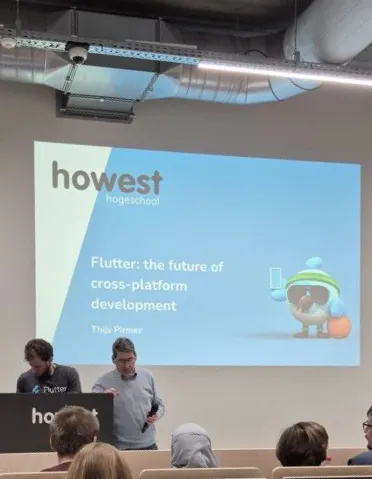
Cross-Platform App Development with Flutter: A Howest Tech & Meet
I spend most of my time in security and offensive tooling, so an evening about app development was a bit of a step outside my usual lane. That’s exactly why I went. The Howest Tech & Meet on cross-platform development with Flutter turned out to be a genuinely useful look at a framework I’d heard plenty about but never really sat down to understand.
The Format
Like the other Tech & Meet evenings Howest runs, this one was built around a focused topic and a single knowledgeable speaker, in a relaxed setting open to students, alumni, and anyone in the local tech scene. The pitch was clear: whether you’re a developer, a designer, or a tech decision-maker, the session would help you understand what “build once, deploy everywhere” actually means and how to make it work on a real project. No marketing fluff, just live demos, practical insights, and honest information based on real-world experience.
The evening was structured simply:
- 19:00 to 19:15 : Introduction to cross-platform app development
- 19:15 to 20:15 : The Flutter framework, building beautiful, high-performance UIs with Flutter’s widget system
The Speaker
The Flutter session was led by Thijs Pirmez from the Howest Cyber3Lab. He’s an Android and iOS developer and an all-around AI researcher, and what I liked about his story is that he started as a self-taught coder and never looked back. That self-taught background came through in how he taught: practical, demo-first, and focused on the things that actually trip people up rather than the polished theory.
What “Build Once, Deploy Everywhere” Really Means
The core promise of Flutter is the one every cross-platform framework makes: write your code once and run it on iOS, Android, web, and desktop from a single codebase. The reason that promise matters is cost and speed. Instead of maintaining separate native teams and codebases for each platform, you maintain one, which cuts development time and the number of people you need to ship and keep an app alive.
What Thijs was careful about, and what made the talk honest rather than a sales pitch, is that “build once, deploy everywhere” comes with real trade-offs. A single codebase is fantastic when your app thrives on shared UI logic and speed to market is the priority. It’s less ideal when you need deep low-level access to device features, when you’re building something performance-intensive like a game or a real-time audio/video experience, or when your team is already deeply invested in another stack. Knowing when not to reach for Flutter is just as valuable as knowing how to use it.
The Flutter Framework
The heart of the evening was Flutter itself, and the widget system in particular. A few things stood out as the pieces that make it click:
Everything is a widget. Flutter builds its UIs out of composable widgets, from layout structure down to styling and individual UI elements. Once the mental model clicks that you’re nesting and composing widgets to build an interface, the whole framework starts to make sense.
Dart under the hood. Flutter uses Google’s Dart language. It’s approachable to pick up and it compiles to native code, which is a big part of why Flutter apps feel smooth and responsive rather than like a web page wrapped in an app shell.
Hot reload. This was the demo highlight. You change your code and see the result almost instantly without restarting the app or losing its state. For anyone used to slow build-run-check loops, watching the UI update live as the code changes is genuinely impressive, and it’s the kind of thing that makes a real difference to how fast you can iterate.
Native-like performance. Because Dart compiles down to native machine code rather than relying on a JavaScript bridge, the apps stay fast. Combined with the rich set of pre-built, customizable widgets, you can get a polished, consistent look across platforms without rebuilding everything per device.
Seeing all of this demonstrated live rather than on slides was the right call. You get a much better feel for the developer experience watching someone actually build and tweak something in real time.
Going Deeper
For anyone who wanted to go well beyond an introductory evening, Howest tied the session into a Flutter masterclass: eight half-day hands-on sessions, with the series starting on November 24th. They also mentioned a similar hands-on React workshop series planned for the second semester, which is a nice signal that they’re building out a proper track for cross-platform and modern front-end development, not just one-off talks.
Why I’m Glad I Went
Stepping outside security for an evening was a good reminder that the tools and trade-offs in app development rhyme with the ones I think about elsewhere. Single codebase versus native, speed versus low-level control, convenience versus performance. These are the same kinds of engineering decisions that show up everywhere in tech, just in a different costume.
I also walked away actually wanting to try Flutter, which is the real test of a good intro session. If I ever need to throw together a cross-platform tool or a quick interface for a project, I now know what the framework offers, where it shines, and where it would fight me. That’s exactly what a Tech & Meet evening is supposed to do.
Another solid one from Howest. Looking forward to the next.
“Cross-Platform App Development with Flutter” was a Howest Tech & Meet session presented by Thijs Pirmez of the Howest Cyber3Lab, with an accompanying eight-session Flutter masterclass.